Portable Smart Lighting for Renters in 2025
Table of Content >>
Toggle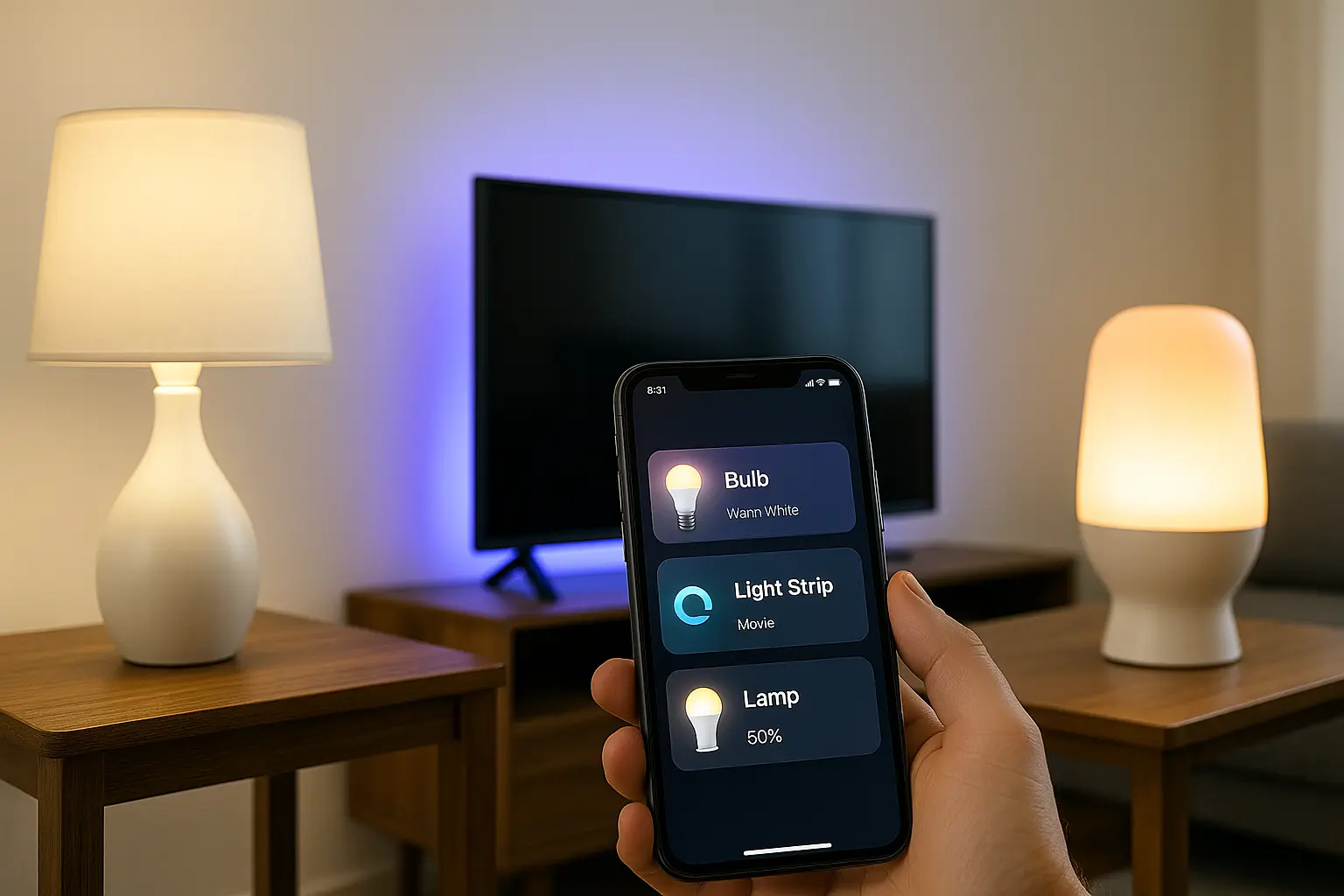
Portable smart lighting for renters lets you upgrade any apartment without drilling, rewiring, or changing landlord fixtures. All ideas on this page travel easily from rental to rental, giving you consistent comfort anywhere you live.
Related Smart Lighting Guides
- How to Turn Any Lamp Into a Smart Lamp in 2 Minutes
- 5 No Drill Ways to Add Smart Lighting to Any Room
- Smart Lighting Layout Ideas for Studio Apartments
- 7 Stick On Smart Devices That Transform Any Room
- How to Improve Sleep Using Smart Home Devices
- How to Build a Smart Morning Routine in Any Living Space
- 5 Smart Kitchen Ideas Without Drilling or Replacing Anything
- How to Use Smart Home Automation to Save Energy in Small Spaces
For a guided starting point, see➜ Portable Smart Home Hub – Start Here.
Introduction
Smart lighting is usually presented as something you install once in a home you own. In reality, renters can enjoy almost all the same benefits using portable, non invasive devices. By focusing on lamps, smart bulbs, smart plugs, LED strips, battery powered lamps, and wireless switches, you can build flexible lighting scenes without touching wiring or walls.
This guide walks through the main device types, where to place them in a rental, how to connect everything to your preferred ecosystem, and which routines give the biggest comfort boost in daily life.
By focusing on portable smart lighting for renters, you avoid the need for permanent fixtures and still get full control over brightness, mood, and routines.
Why Portable Smart Lighting is Perfect for Renters
- No drilling, rewiring, or junction boxes. Everything works from standard outlets and lamps.
- Easy to install and remove. You can reset the apartment in minutes when you move out.
- Fully portable. The same lamps, strips, and switches travel with you to the next home.
- Automation for comfort. Wake up lights, night paths, and movie scenes work the same in every rental.
- Low risk for leases and deposits. As long as you avoid strong adhesives and do not overload circuits, the setup is landlord friendly. These benefits explain why portable smart lighting for renters has become one of the most flexible upgrades for studios, shared homes, and long term stays abroad.
Choosing an Ecosystem for Portable Lighting
Portable smart lighting works best when all devices live in one ecosystem. This keeps routines simple and avoids reconfiguring dozens of apps every time you move.
In most cases, your phone and your first smart speaker will decide your ecosystem. The goal is not perfection. The goal is to pick one platform and stick to it for all new lighting devices.
Any of these ecosystems work as long as all your portable smart lighting for renters stays inside one unified platform.

- Works with many budget smart bulbs and smart plugs.
- Great for voice control of scenes like Movie, Night, or Morning.
- Strong support for multi room audio and lighting in small apartments.

- Very natural voice commands that work well in shared spaces.
- Good routines for wake up, sleep, and energy saving.
- Nice option if you already use Android and Google services daily.

- Focus on privacy and local control where possible.
- Very stable once set up, especially for everyday routines.
- Ideal if you already own an iPhone and maybe a HomePod Mini.
As a renter, the most important thing is to choose one system and keep buying devices that work smoothly with it. This way, your entire lighting setup can be carried from rental to rental with minimal friction.
Keeping everything inside one platform makes portable smart lighting for renters far more predictable across different apartments.
Portable Smart Lighting for Renters – Devices You Can Use Anywhere
All the device types below work without modifying the rental. They either plug into existing outlets, sit on shelves, or use gentle adhesive that can be removed carefully when you leave.
Each category plays a specific role in portable smart lighting for renters, giving you a flexible set of tools to brighten any space safely.
Smart Bulbs
Smart bulbs screw into regular lamps or ceiling fixtures. They give you control over on or off, brightness, and often color temperature. You can create scenes and automations without touching the wall switch.
Best for: bedside lamps, floor lamps, table lamps, and any fixture where you can easily swap the bulb.
Smart Plugs for Lamps
Smart plugs sit between the wall outlet and the lamp plug. They let you turn the lamp on or off by app, voice, or routine. This is ideal when you like the current bulb or shade and do not want to replace it.
Best for: vintage lamps, special bulbs, or any lamp you want to keep exactly as it is physically.
LED Strip Lights
LED strips add indirect glow along edges, under furniture, or behind screens. They are usually adhesive backed and can be powered from outlets or USB. When used carefully, they give a very high effect with minimal equipment.
Best for: behind the TV, under a bed, along shelves, under kitchen cabinets, or around a desk.
Battery Powered Lamps
Rechargeable table lamps and portable lanterns are perfect for balconies, corners without outlets, or hallways where you do not want cables. Some models also support smart control or at least simple brightness levels.
Wireless Switches and Dimmers
Wireless switches, buttons, and dimmers stick to walls or sit on tables. They control groups of lights without touching the landlord switches. Many systems let you place several switches for the same scene, which is ideal in studios where one space has multiple uses.
Motion Activated Night Lights
Small motion lights plug into outlets or run on batteries. They turn on only when you walk by in the dark. This is a simple way to light hallways or bathrooms without the shock of bright ceiling lights at night.
These options form the core of portable smart lighting for renters because they install fast and remove cleanly when you move.
Where to Place Smart Lighting in Rentals
These layouts give you a starting point. You can copy them as they are or adjust them to your own floor plan and budget. The goal is to light the space in layers so that bright task light and soft mood light both exist when you need them.
Living Room in a Small Apartment
- One floor lamp with a smart bulb for main light.
- LED strip behind the TV for indirect glow.
- Corner table lamp on a smart plug for flexible mood light.
- Wireless button near the sofa to trigger a Movie or Reading scene.
Rental Bedroom Wake Up and Sleep Setup
- Warm smart bulb in the bedside lamp for gentle light.
- LED strip under the bed or behind the headboard for soft indirect light.
- Small motion night light near the bathroom door for late night trips.
Kitchen and Cooking Area
- LED strip under cabinets or shelves above the counter.
- Small lamp on a smart plug to add light to a dark corner.
- Adhesive wireless switch next to the work area for quick on or off control.
Hallways and Entry Areas
- Battery powered motion light near the entrance.
- Soft LED strip along the floor or furniture base to guide steps in the dark.
Studio Apartment Starter Layout
- One main lamp with a smart bulb for general light.
- One LED strip used either behind the bed or TV.
- One smart plug for a second lamp or decorative light.
-
One wireless button to switch between Work, Relax, and Sleep scenes.
Good placement is a major part of portable smart lighting for renters because it reduces glare, improves comfort, and avoids the need for permanent wiring.
Lighting Automation Ideas for Renters
These automations are designed to work with portable smart lighting for renters so you avoid reliance on permanent wiring or landlord fixtures.
Three builds under $50
Once the devices are installed, automation is what makes the space feel truly smart. These ideas use only portable devices and do not require modifications to the rental wiring.
Wake Up Routine
Set your bedside lamp to slowly brighten over fifteen to twenty minutes before your alarm. Use warm white light instead of cold blue tones to make mornings softer on the eyes.
Sunset or Evening Routine
As daylight fades, turn on living room and kitchen lamps automatically at low brightness. This avoids the harsh feeling of a dark room followed by sudden full brightness.
Night Pathway Mode
Use motion lights or LED strips with very low brightness to guide movement to the bathroom at night. The goal is to see enough to walk safely while avoiding bright light that fully wakes the brain.
Movie or Focus Mode
Create a scene that turns off main lamps, keeps only LED strips or one side lamp at low brightness, and optionally adjusts sound. Trigger it with a button or voice command so you do not need to walk around switching lamps off.
Kitchen Task Lighting
When you start cooking in the evening, one button press can bring up a bright LED strip under cabinets and a secondary lamp near the counter. When you finish, a second press returns the room to softer ambient light.
For room by room layouts, read:
Smart Lighting Layout Ideas for Studio Apartments.
Budget Friendly Lighting Setups for Renters
These example bundles give a sense of what you can achieve at different price levels. Exact prices vary by brand and country, but the structure remains useful.
Starter Setup Under 50
- One smart bulb for a bedside or living room lamp.
- One motion night light for the hallway or bathroom.
Comfort Setup Under 100
- One smart bulb for the main lamp.
- One smart plug for a second lamp.
- One LED strip for the TV area or bedroom.
Full Room Setup Under 200
- Two or more smart bulbs for living room and bedroom lamps.
- One or two smart plugs for decorative lights and work lamps.
- One LED strip for ambience.
- One wireless button to recall scenes.
- One motion night light for the hall or bathroom.
Smart Bulb vs Smart Plug vs LED Strip vs Battery Lamp
| Device | Best For | Pros | Limitations |
|---|---|---|---|
| Smart Bulb | Lamps and simple fixtures | Easy installation, dimming, color control | Only works in fixtures where you can change the bulb |
| Smart Plug | Lamps and small appliances | Keeps original bulb and lamp style, simple on or off control | No true dimming unless the lamp itself has a dimmer |
| LED Strip | Indirect and mood lighting | High visual impact, flexible placement | Adhesive requires care on rental walls and furniture |
| Battery Lamp | Spots without outlets, balconies | Very portable, no cables | Needs charging or battery replacement |
This table can guide which device you pick first for each corner of your rental.
What Not to Do with Smart Lighting in a Rental
- Do not use aggressive industrial adhesives on painted walls or delicate furniture.
- Do not run LED strips on dusty, greasy, or flaky paint. Clean the surface gently first so the strip sticks without needing stronger glue.
- Do not overload extension cords or multi outlets with many lamps and heaters. Keep lighting loads modest and use certified equipment.
- Do not block vents or cover lamps with fabric in a way that traps heat.
- When you move out, peel LED strips off slowly instead of pulling fast. This reduces the chance of peeling paint.
Once you understand the basics of portable smart lighting for renters, you can expand with scenes, sensors, and routines that follow you to each new home.
By following these principles, portable smart lighting for renters becomes a simple upgrade that works in almost any home layout.
Troubleshooting - Smart lighting not responding
The bulb shows offline after moving apartments
This happens when the bulb tries to reconnect to an old router. Reset the bulb once and connect it to your portable Wi-Fi network so it always keeps the same SSID.
Wi-Fi setup guide: Portable Smart Wi-Fi Zone.
Scenes activate late or not at all
Check your app permissions for scheduling, battery optimization, or time zone. Many phones block background tasks by default.
If you prefer fixed-timer routines, see: Smart Morning Routine.
The lamp flickers when dimmed
Smart bulbs should not be used with wall dimmers. Set the wall switch to full power and control brightness only from the app.
FAQ
Do LED strips damage walls in rentals?
They usually do not when applied on clean surfaces and removed slowly, but any adhesive carries some risk. Test a small area first and avoid very fresh paint. For guidance on safe adhesive removal, see 3M’s official instructions: https://www.3m.com/3M/en_US/company-us/all-3m-products/~/All-3M-Products/Command/Can I use smart lights without Wi-Fi?
Some smart bulbs work with Bluetooth or a local remote. They offer basic control even without a full network, which helps in temporary stays.Are smart lights safe to leave on while I am out?
Use certified products from known brands, avoid covering lamps with fabric, and treat them like regular electrical devices. With normal precautions, smart lights are as safe as standard bulbs.Which smart bulbs work without an extra hub?
Many Wi-Fi and Bluetooth bulbs connect directly to your router or phone. These are ideal for renters who want simple setups without extra hardware.Are smart lights allowed in rentals?
Yes. You are not changing wiring, and everything can be removed cleanly. Avoid permanent changes, strong adhesives, or unsafe electrical loads.Once your base setup is stable, expanding your portable smart lighting for renters is straightforward and budget friendly.
For a guided starting point, see➜ Portable Smart Home Hub – Start Here.